

What is OVL(Order Volume Limit)?

Key Points
- An Order Volume Limit (OVL) restricts the number of daily orders your shop can receive.
- Once the OVL is reached, your products will show as “Sold Out” to customers.
- OVL may be applied due to probation status, performance issues (like high LDR or SFCR), or other risk triggers.
- Sellers can view OVL status in Seller Center and may appeal under certain conditions.
What is an OVL?
Order Volume Limit (OVL) is a system restriction that temporarily limits the number of new orders a seller can receive in a single day. Once the limit is reached:- Your products will appear as “Sold Out” to customers.
- Your shop will not receive additional orders until the limit resets on the next day.
The OVL resets automatically at the start of each new calendar day.
When Might OVL Be Applied?
OVL can be applied in the following situations:Situation | Description |
| New Shop Probation | All new sellers are automatically subject to a daily order limit. |
| High Violation Rates | If your Late Dispatch Rate (LDR) or Seller Fault Cancellation Rate (SFCR) is high. |
| Operational Risk | If TikTok Shop detects fulfillment capacity concerns. |
| Other Risk Triggers | Any special situation where TikTok Shop determines that limiting order volume protects buyers or the platform. |
If multiple OVL rules apply, the lowest limit will be used.
How Will I Know If I Have an OVL?
You can find OVL information in the following places:Situation | Where to Check |
| OVL due to probation or other reasons | You’ll see a banner on your Seller Center homepage or Manage Orders tab showing the daily limit |
| OVL due to violation | Go to Seller Center > Shop Health > Violation Records |
OVL due to Violation
If your OVL is due to a violation, the information will be visible in two places:- On the Seller Center Banner(To check the OVL Quantity): You will see a banner on your Seller Center homepage or Manage Orders tab. This banner shows the daily order limit you are subject to.

- In Account Health(To check the Details and Reason): To understand the specific violation that caused the OVL, go to Seller Center > Account Health > Violation Records.
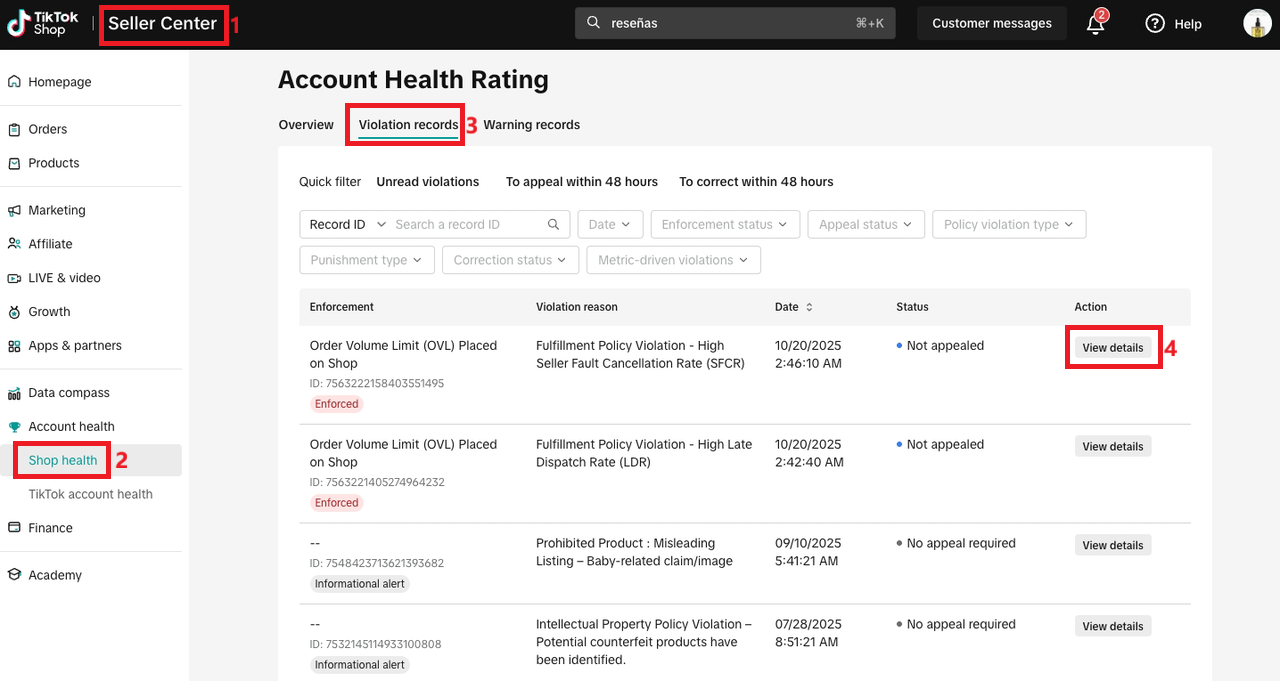
- Selecting "View details" opens the Violation ticket details. As shown below, the 'Enforcement action taken' section confirms the OVL is placed on shop and specifies its effective time
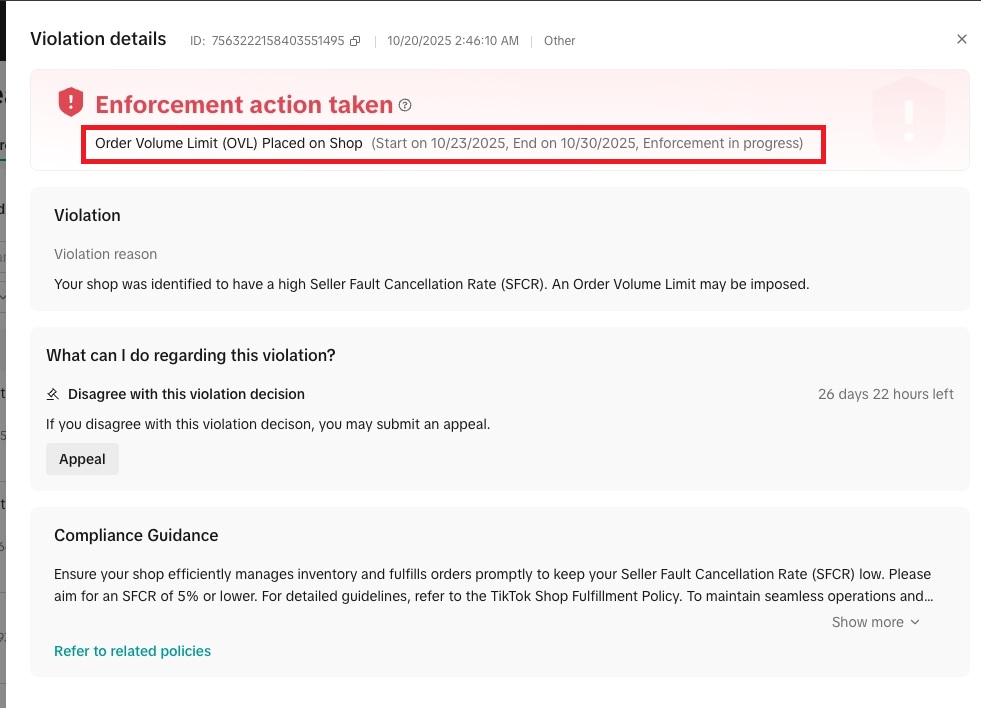
- Selecting "View details" opens the Violation ticket details. As shown below, the 'Enforcement action taken' section confirms the OVL is placed on shop and specifies its effective time
OVL due to Probation or other reasons
If your OVL is due to new shop probation, you can check your OVL quantity on the banner on your Seller Center homepage or Manage Orders tab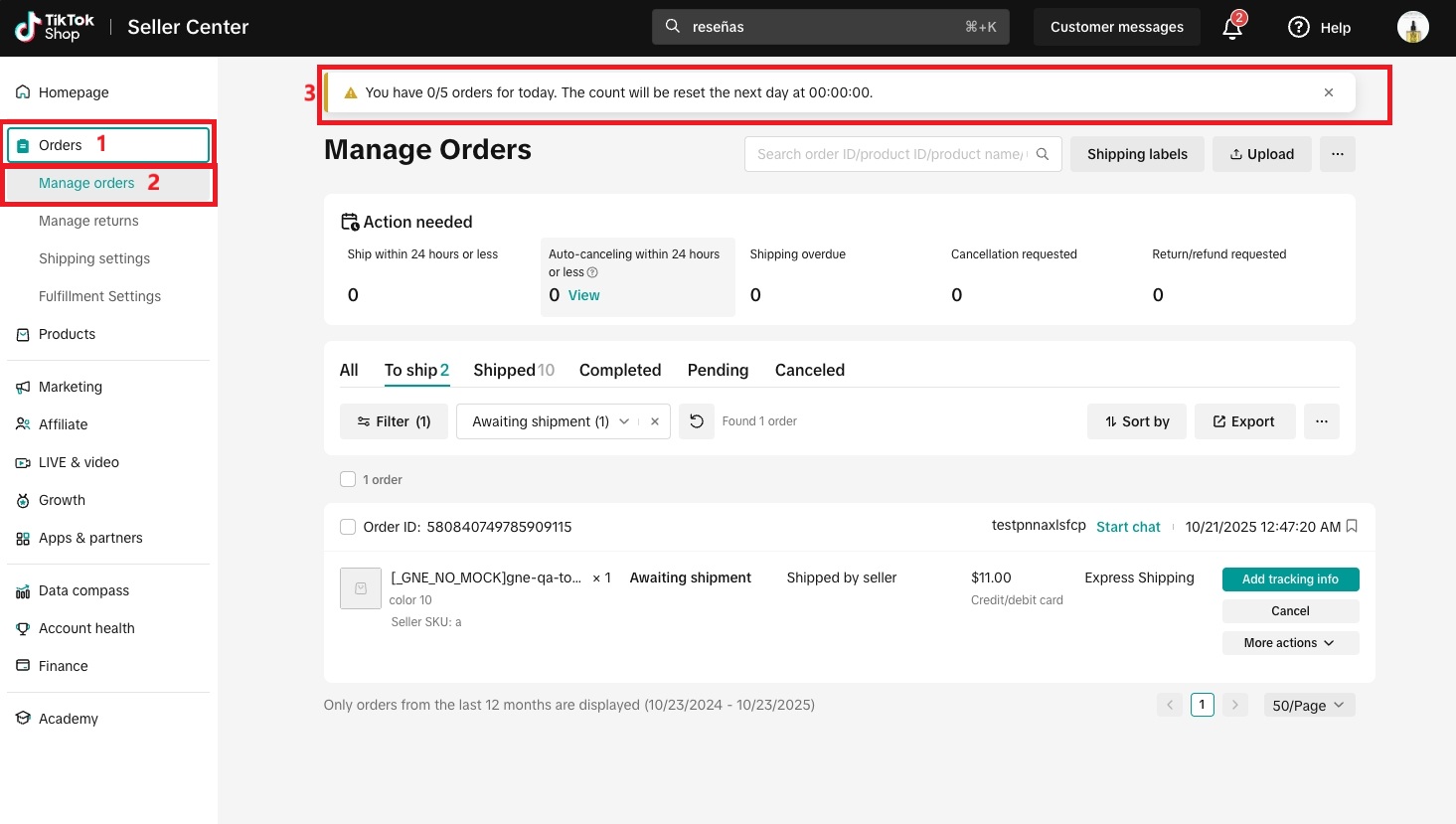 For full details on probation rules and graduation criteria, please refer to our guide: Guidelines for New Shop Probation Period
What Happens When I Reach the Limit?
- A banner appears in your Seller Center showing that the limit has been hit.
- All products will be automatically marked as “Sold Out” to customers.
- You cannot accept new orders until the next calendar day.