

TikTok for Shopify - FAQ's
About Set-Up and Log-In
Q: Can one Shopify store be connected to multiple TT accounts
No, any point of time one Shopify store can only be connected to one TikTok Shop account. The seller can either- Create a new Shopify store within the same Shopify account, install TikTok app and connect to different TikTok account (or)
- Disconnect TikTok Shop from existing Shopify store and connect to another TikTok Shop account
Q: Unable to connect to Shopify and seeing an error "Seller not main account"
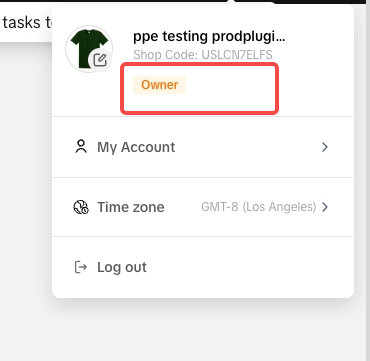
With current TTS set up, only the main owner account can set up with Shopify and not any other role on TTS. If any other role on TTS tries with Shopify set up, the seller sees the error below.
- Logging into TikTok Shop
- Click on profile icon on the top right
- They should see role tagged as Owner something like below
Q: Can I connect Shopify US store to TikTok MX
No, current Shopify integration is region specific and Shopify MX store can only connect to TikTok MX, ShopifyUS store can only connect to TikTok US. The seller can verify Shopify location based on Billing address from Shopify like from Shopify --> Settings --> General shown as below

Q: I am not seeing TikTok Shop option when I installed TikTok app on Shopify and only seeing TikTok for Marketing in Overview page
This is expected if you are trying to connect cross region accounts without TikTok Shop account in the existing Shopify billing region. The seller can verify Shopify location based on Billing address from Shopify like from Shopify --> Settings --> General shown as below
About Product and Inventory Management
Q: Why were only 100 products synced to my TikTok Shop?
As a new seller on TikTok Shop we limit your daily product sync count to 100 products. The product sync limit resets daily and you are able to sync another 100 products the next day.Q: How can I modify the synced product title and description for only TikTok Shop and not Shopify?
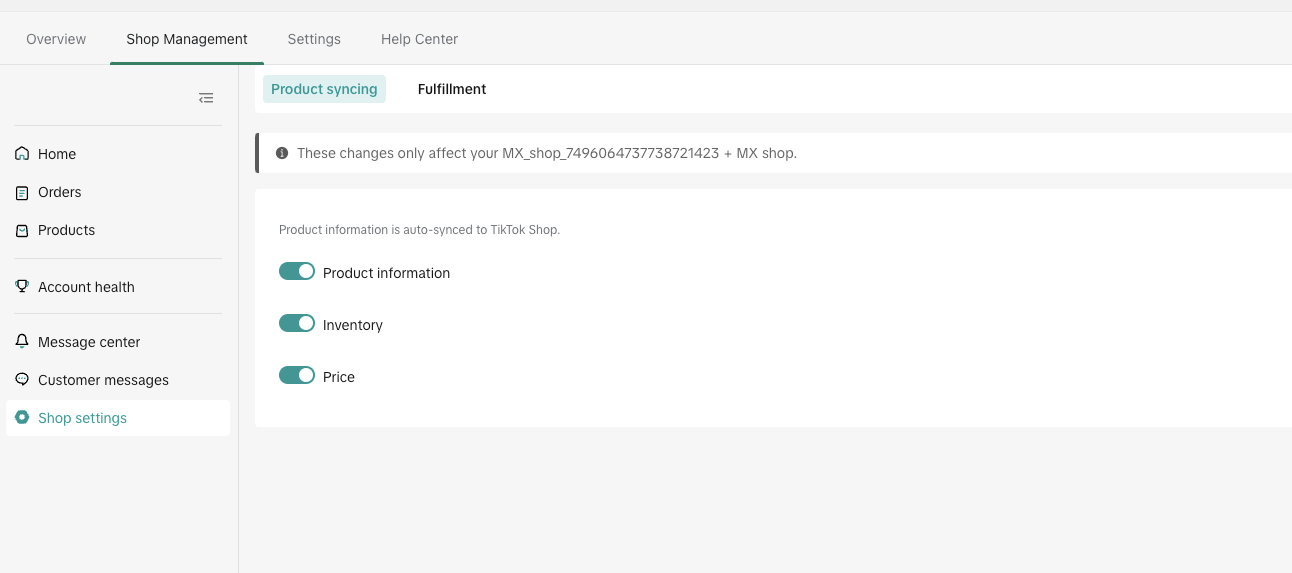
Sellers can now update product details like inventory, price, and title uniquely for TikTok Shop. By disabling the Product Inventory sync, these changes stay distinct, avoiding any mix-up between Shopify and TikTok Shop.Step 1: Navigate to the TikTok for Shopify app > Shop Management > Product Sync settings
- Go to TikTok Shop Seller Center
- Go to 'Products'
- Select 'Manage Products'
- Choose the product you wish to make changes
- Click 'Edit' and make changes to its Price, Description, Inventory, Title, etc.
- Click 'Update' to save changes